Implementation
Ideas
ProQuest Direct SiteBuilder is not
rocket science. Heck, it's not science at all. You find what you need in ProQuest Direct, capture the link (and optionally modify it), secure the link using
convenient access control methods, and insert the link
into text or an image on your page. That's it.
You can do this. You don't have to
be a technical wizard. (Although of course, wizards are encouraged to dive right in and
edit ProQuest Direct links by hand, or use the Search for
Publication link to enhance an OPAC.)
Visitors to your site will love the
ease with which they can view articles, lists of articles, or even search for articles
themselves. And if they can't get to your site...you can include the links in
an email message.
Here are some ideas...
Provide a Link to a Specific
Article
Create a link to display a specific article with
the Article Retrieve link.
Provide a Reading List of
Selected Articles
Using the Article Retrieve Link
Use the Article Retrieve
link to build a list—as individual links—of selected articles that you want
to share.
Using the Search by Word Link
Use the Search by
Word link to provide access to the list of
articles—called Search Results in ProQuest Direct—found by a search that you
defined.
Using the Search for Publication
Link
Use the Search for
Publication link to provide access to the list of
articles (contents) available in a specific issue.
Provide Lists of Publications or
Issues
Use the Search for Publication
link to create links to lists of magazines,
journals, dissertations and other publications, or to lists of available issues of a
specific publication.
Provide a Search Page
The Search by Word and Search for Publication
links let you capture generic search pages you can use as templates for your own
application. We encourage you to customize these pages...using buttons, text, colors, and
other elements so they are visually compatible with the rest of your site.
Search by Word
Use the Search by Word link
to let users search for articles containing specific
words or phrases.
Search for
Publication
Use the Search for Publication
link to let users search for publications and access specific issues and their contents.
A Sample Site
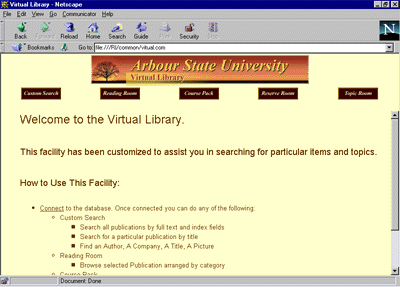
The image below shows the homepage for mythical Arbour
State University. This site incorporates all of the ideas listed above. It provides
students and faculty with access to:
 |
A Custom Search page
that supports keyword and publication searching. |
|
A Reading Room page
that provides users with access to publications categorized by subjects such as business
and economics. |
|
Course Packs of
selected articles—required/suggested reading for specific courses. |
|
A Reserve Room of
selected articles reserved by instructors for their students. |
|
A Topics Room that
allows users to browse for articles by selecting topics, such as aerospace. |
|

